
Hi! I am Nate and I am pursuing a B.S Electrical Engineering and a B.S Computer Engineering at West Virginia University. I am obsessed with microelectronics and circuit design. I like to program as a hobby as well as skateboard and snowboard!
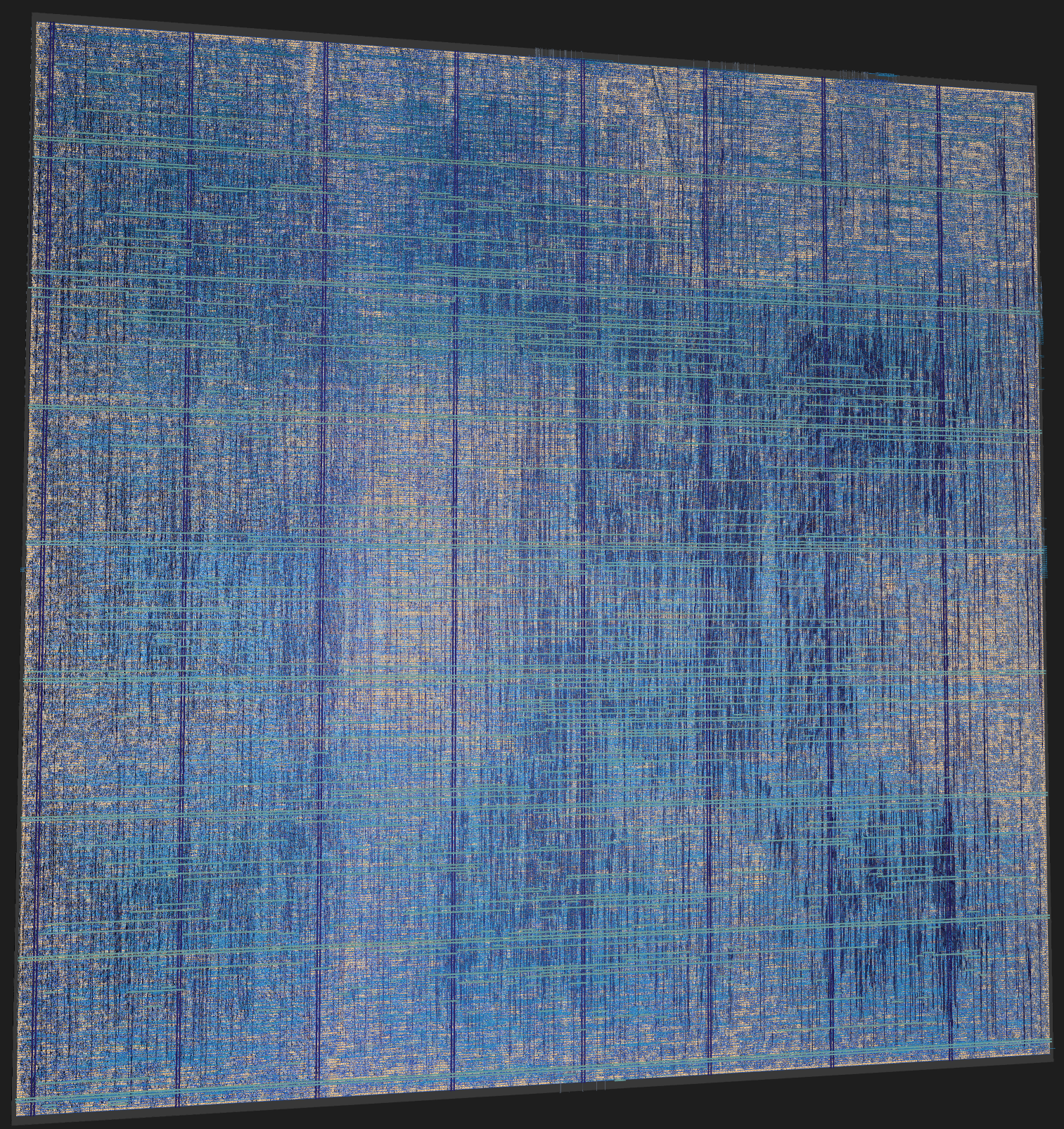
A simple SIMT GPU architecture written in SystemVerilog and taken from RTL to GDSII with the LibreLane flow. Features a warp scheduler that interleaves warps, per-thread program counters for branch reconvergence, and a cocotb testbench that runs arbitrary kernels.
More Details…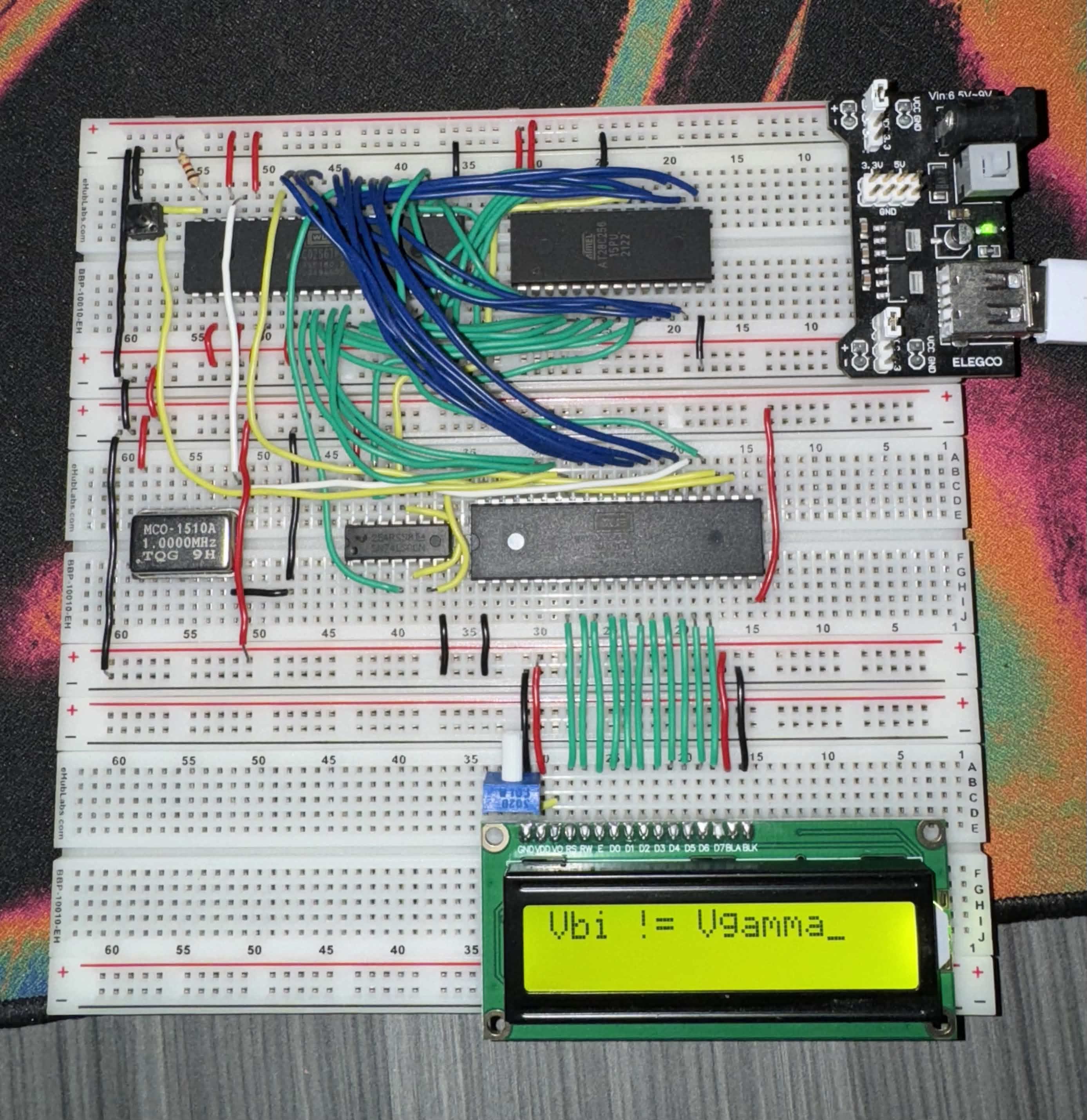
Built a 6502-based breadboard computer from scratch. Assembled the full system including clock circuit, 6502 CPU, RAM, ROM, and I/O. Programmed in 6502 assembly to understand low-level CPU operation, bus architecture, and memory-mapped I/O.
More Details…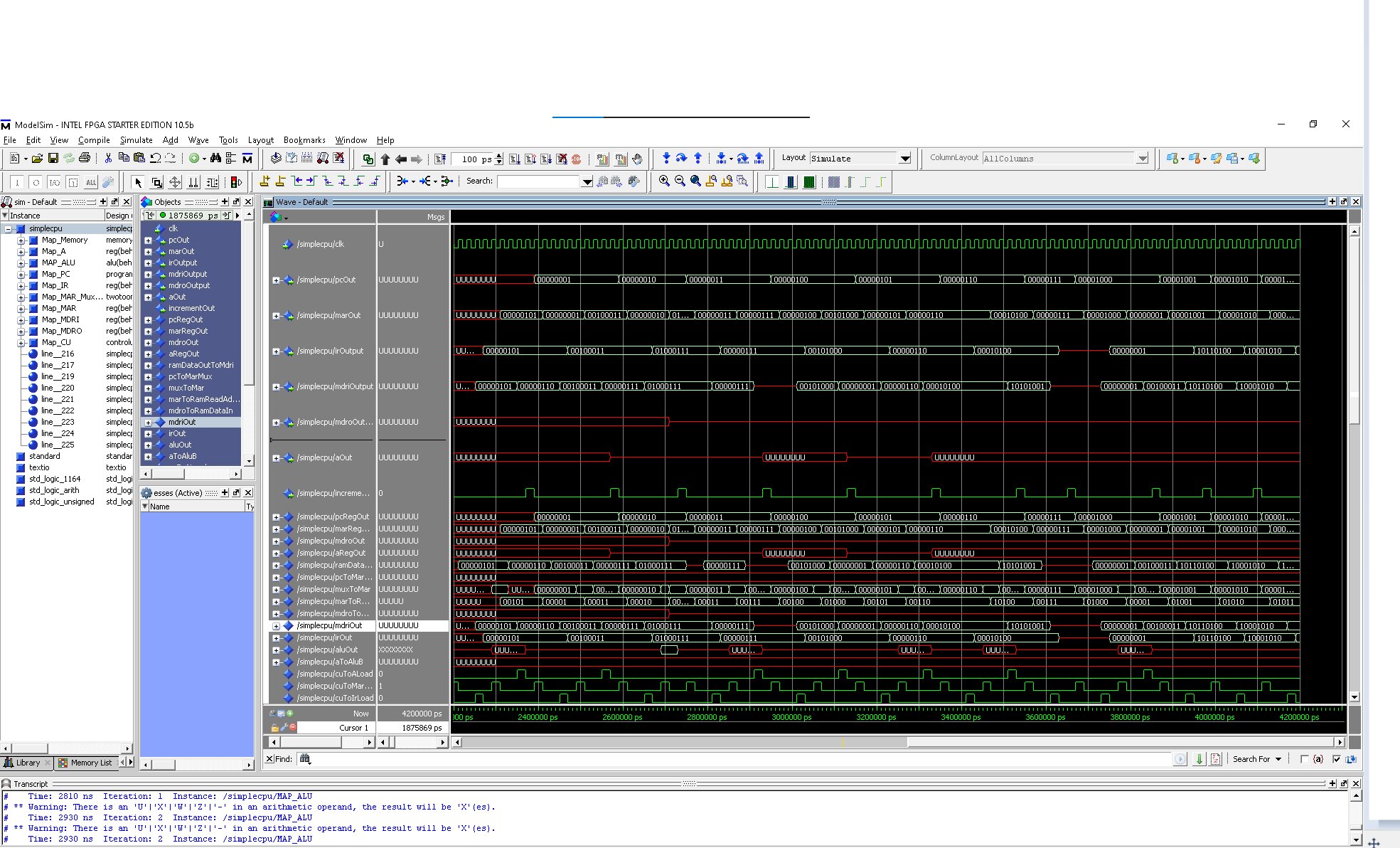
Designed and synthesized a fully functional CPU in VHDL. Features ALU, Control Unit, Program Counter, register file, and 8×32 memory. Deployed on physical FPGA hardware with simulation testbenches.
More Details…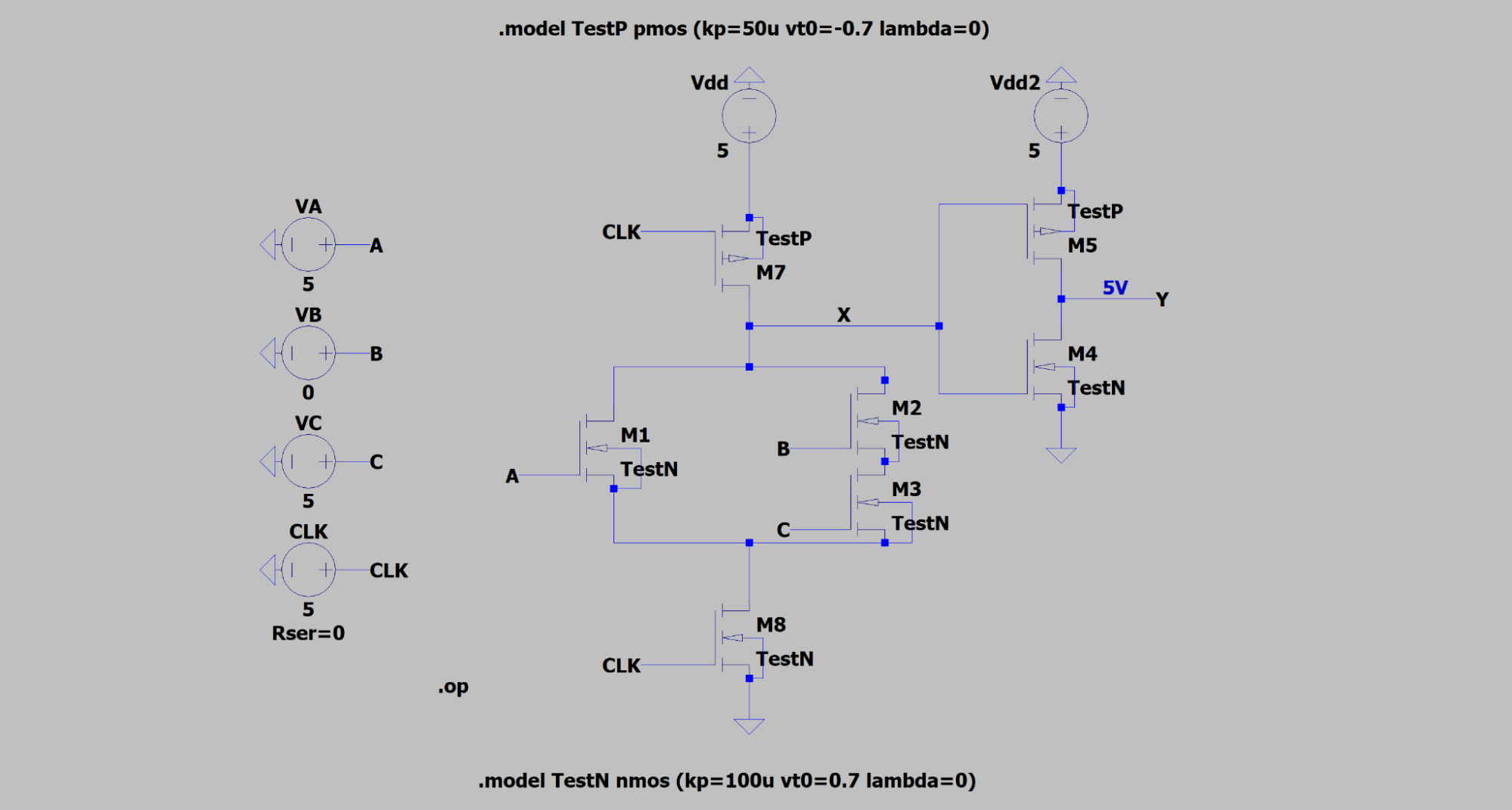
Simulated CMOS inverter and multi-transistor logic circuits in LTSpice. Optimized PMOS W/L ratios for symmetric switching; verified noise margins with 0.15V tolerance via VIL/VIH/VOL/VOH extraction.
More Details…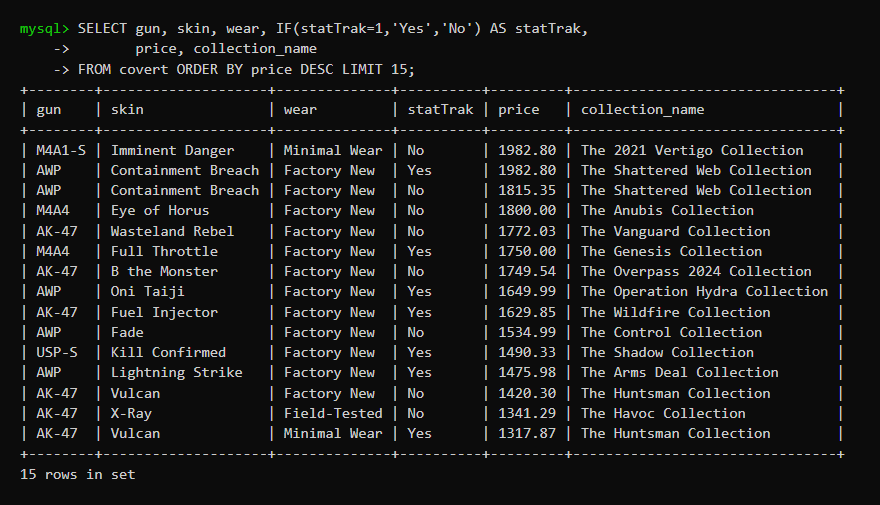
Concurrent GoLang scraper collecting live CS2 item pricing through a distributed SOCKS5 proxy pool. Stored in structured MySQL schema as a standalone pricing backend.
More Details…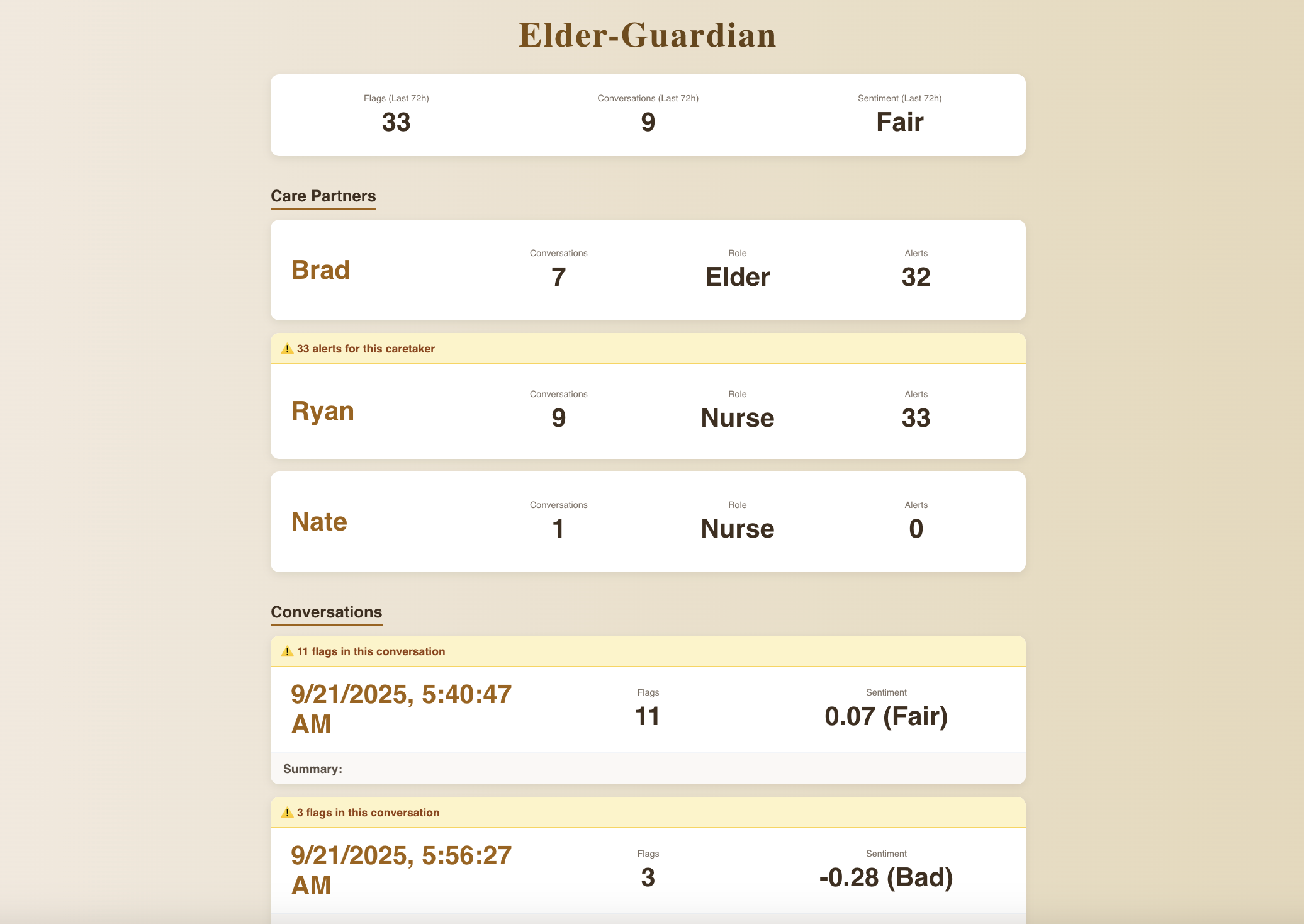
Built elder abuse monitoring software in <24 hrs at SteelHacks XII using Python ML to process and categorize audio speech. Won the Healthcare Optimization and Civics & Accessibility categories out of 500+ participants.
More Details…kGPU is a very simplistic SIMT GPU architecture. It is built in SystemVerilog and synthesized through the LibreLane synthesis flow. kGPU comes fully featured with a warp scheduler to interleave warps and supports branch reconvergence.
kGPU supports executing arbitrary kernels via cocotb in Python. There are currently 2 kernels in
gpu_testbench.py, one that does not branch and one that diverges.
There are a few good resources out there for learning the architecture of GPUs but very few for the goal I was trying to reach. I wanted to try and cover some modern abstraction while keeping the SM simple and lightweight. Here is a run through of the architecture of the GPU and all of the details that went in to it.
Tooling / Workflow
Simulation
The majority of the project is dominated by SystemVerilog and Verilator. I chose Verilator as the compiler due to its simple 2 state simulator design (0, 1) rather than four states (0, 1, X, Z). I had no use for the extra Unknown, and High Impedance values so I opted for the less strict 2 state simulator.
To run the simulation install dependencies:
sudo apt-get update
sudo apt-get upgrade
sudo apt-get install git help2man perl python3 make autoconf g++ flex bison ccache libgoogle-perftools-dev libjemalloc-dev numactl perl-doc libfl2 libfl-dev zlibc zlib1g zlib1g-dev liblz4 liblz4-dev
Clone and build Verilator:
git clone https://github.com/verilator/verilator
cd verilator
unset VERILATOR_ROOT
autoconf
./configure
make -j `nproc`
sudo make install
Then install cocotb:
pip install cocotbAnd finally run the simulation:
cd kGPU/Testbenches/
make
Verification
For me Python was the go to language for verification of functionality. I liked the implementation of cocotb as the arbiter due to its flexibility and writability. I based my configuration off of tiny-gpu using cocotb to interface with the GPU to schedule kernels and manage the off chip memory that the hardware communicates with. This gave me an easy workflow for compiling and simulating using Makefile and Verilator. It drastically simplified the steps without sacrificing efficiency or correctness.
Synthesis
The RTL → GDSII pipeline was satisfied by LibreLane. This includes Yosys for gate-level netlist synthesis, OpenROAD for PnR, Magic and KLayout for physical verification, and Netgen for netlist comparison. The specs were kept to 1 SM, 2 warps, and 8 threads per warp to keep the PPA within reasonable limits for a personal project.
Architecture
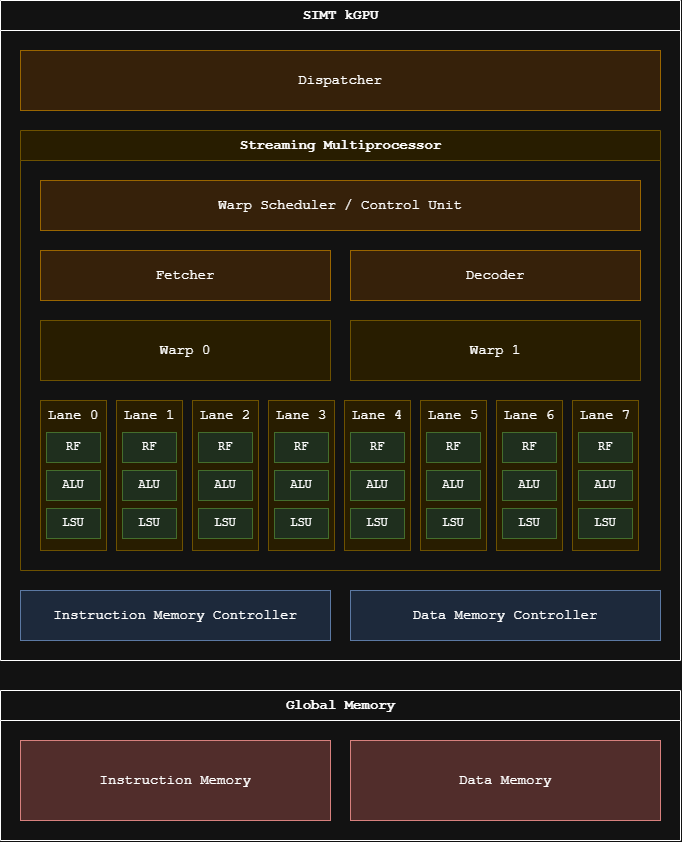
kGPU is built bottom up as GPU → Dispatcher → SM → Warps/Lanes. Everything is parameterized, so the same RTL can scale from my small synthesized config up to something closer to a real part.
Instruction Set
kGPU uses a fixed 32-bit instruction width. The table below describes all operations:
| Opcode | Function | Structure |
|---|---|---|
| NOP | PC = PC + 1 | 000000 xxxxx xxxxx xxxxxxxxxxxxxxxx |
| ADD | Rd = Rs + Rt | 000001 sssss ttttt ddddd xxxxxxxxxxx |
| SUB | Rd = Rs − Rt | 000010 sssss ttttt ddddd xxxxxxxxxxx |
| MUL | Rd = Rs × Rt | 000011 sssss ttttt ddddd xxxxxxxxxxx |
| DIV | Rd = Rs / Rt | 000100 sssss ttttt ddddd xxxxxxxxxxx |
| STR | Mem[Rt] = Rs | 000101 sssss ttttt xxxxxxxxxxxxxxxx |
| LDR | Rs = Mem[Rt] | 000110 sssss ttttt xxxxxxxxxxxxxxxx |
| RET | finished | 000111 xxxxxxxxxxxxxxxxxxxxxxxxxx |
| MOV | Rs = IMM16 | 001000 sssss xxxxx iiiiiiiiiiiiiiii |
| BEQ | Rs == Rt → PC = IMM16 | 001001 sssss ttttt iiiiiiiiiiiiiiii |
| BNE | Rs != Rt → PC = IMM16 | 001010 sssss ttttt iiiiiiiiiiiiiiii |
| BLT | Rs < Rt → PC = IMM16 | 001011 sssss ttttt iiiiiiiiiiiiiiii |
| B | PC = IMM16 | 001100 sssss xxxxx iiiiiiiiiiiiiiii |
Opcodes are 6 bits wide, registers are 5 bits wide and the immediate is 16 bits wide as illustrated in the table. When there is an instruction with no immediate, Rd takes the slot from bit 15 down to 11.
- ADD → Computes the addition of register Rs and Rt and stores it in register Rd.
- SUB → Computes the subtraction of register Rt from Rs and stores it in register Rd.
- MUL → Computes the product of register Rs and Rt and stores it in register Rd.
- DIV → NON FUNCTIONAL. Removed due to massive synthesis issues (WIP).
- NOP → Do nothing and increment PC.
- STR → Store Rs in to the global memory address in Rt.
- LDR → Load Rs with the data from global memory address Rt.
- RET → Kernel has reached the end of its instructions.
- MOV → Load register Rs with IMM16.
- BEQ → Update PC to IMM16 if Rs == Rt.
- BNE → Update PC to IMM16 if Rs != Rt.
- BLT → Update PC to IMM16 if Rs < Rt.
- B → Update PC to IMM16 unconditionally.
Hardware
Dispatcher
The dispatcher glues the testbench and the SMs together. The testbench provides the dispatcher
with a PC, number of blocks, and blockDimx then pulses start. The
dispatcher looks for the lowest free warp slots across all the SMs and launches the next block in
to it. One block maps to one warp now so blockDimx cannot exceed the size of the warp
(32 threads). The excess are masked off via thread_enable. Once every SM reports it is
finished, kernel execution is stopped via kernel_done being raised.
Streaming Multiprocessor (SM)
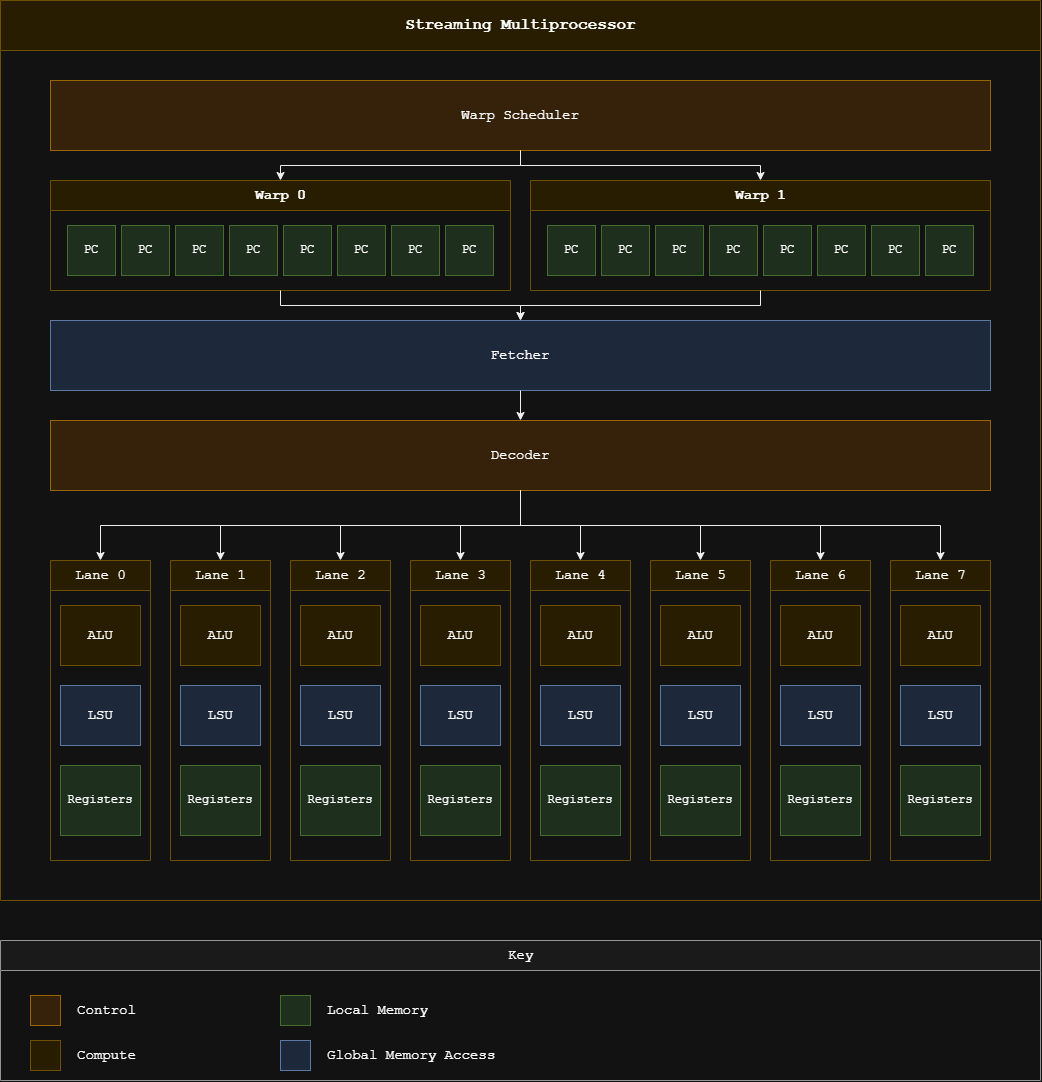
The SM is the most essential part of the design. It instantiates a fetcher, decoder, and a control unit that is common between all of its warps. The SM is multicycled instead of pipelined for simplicity reasons but in the future I plan on pipelining the SM to keep execution cycles low and efficient.
Warp Scheduler
The warp scheduler is bundled with the controlunit and picks the next warp based on
the ones that are already finished. If a warp has already finished its execution it will be skipped.
Warps and Branch Reconvergence
Each warp has 32 threads which each have their own program counter. This is to combat branch divergence. The warp only executes the lowest PC threads so they can catch up to the threads that are further along so that all threads equalize their PCs again and merge back together. This reconvergence requires no reconvergence stack, however one downside of this crude approach (waiting for diverging PCs) is that if a thread loops, the entire warp has to wait for the thread.
Lanes
A lane is essentially a datapath for a thread. It gets its own Register File, ALU, and LSU. All of the lanes get the same decoded instruction however only the active ones (not masked off) write back. The lane evaluates any branch condition and sends it back to the warp so it can update the thread's PC accordingly.
Register File
Each lane has a single 32 registers × 16 bit register file. The register file comes preloaded with 3 values:
| Register | Value |
|---|---|
r31 | blockDim.x |
r30 | blockIdx.x |
r29 | threadIdx.x |
These allow the kernel to compute the global index for the thread, the same way it would in CUDA.
Load/Store Unit
Each lane also has its own Load/Store Unit to communicate to and from global memory. This means that each thread can issue its own memory requests. The SM stays in the WAIT state until every active lane's LSU finishes execution.
Memory
Instruction memory and data memory are separated. Instruction memory is 32 bits wide due to the
32 bit instruction and has 16 bits of addresses. Data memory is 16 bits wide and also has 16 bits
of addresses. They exist in the Python testbench and are what the memory controller communicates
to from the simulation. They are connected through memchannelinterface. The
instruction memory serves 1 fetcher per SM while the data memory serves
NUM_SMS × WARP_SIZE requesters.
Kernels
The first kernel is a proof of concept kernel that always converges. It takes the gid of the current thread, multiplies it by 3, and then adds 5 to it and stores it in the global memory address of its thread past the input block.
add_const
add_const.asm
.blocks 16
.threads 8
.data @256 0 3 6 9 ...         ; input array, in[gid] = gid * 3

MOV R1, #5                     ; constant to add
MOV R7, #256                   ; IN_BASE (input array base address)

MUL R3, %blockIdx, %blockDim
ADD R4, R3, %threadIdx         ; gid = blockIdx * blockDim + threadIdx

ADD R6, R4, R7                 ; addr(in[gid]) = IN_BASE + gid
LDR R5, R6                     ; load in[gid] from global memory

ADD R2, R5, R1                 ; out = in[gid] + 5
STR R2, R4                     ; store out[gid] in global memory

RET                            ; end of kernel
Output — add_const: 16 blocks × 8 threads finished in 2099 cycles
| block | t0 | t1 | t2 | t3 | t4 | t5 | t6 | t7 | result |
|---|---|---|---|---|---|---|---|---|---|
| 0 | 5 | 8 | 11 | 14 | 17 | 20 | 23 | 26 | PASS |
| 1 | 29 | 32 | 35 | 38 | 41 | 44 | 47 | 50 | PASS |
| 2 | 53 | 56 | 59 | 62 | 65 | 68 | 71 | 74 | PASS |
| 3 | 77 | 80 | 83 | 86 | 89 | 92 | 95 | 98 | PASS |
| 4 | 101 | 104 | 107 | 110 | 113 | 116 | 119 | 122 | PASS |
| 5 | 125 | 128 | 131 | 134 | 137 | 140 | 143 | 146 | PASS |
| 6 | 149 | 152 | 155 | 158 | 161 | 164 | 167 | 170 | PASS |
| 7 | 173 | 176 | 179 | 182 | 185 | 188 | 191 | 194 | PASS |
| 8 | 197 | 200 | 203 | 206 | 209 | 212 | 215 | 218 | PASS |
| 9 | 221 | 224 | 227 | 230 | 233 | 236 | 239 | 242 | PASS |
| 10 | 245 | 248 | 251 | 254 | 257 | 260 | 263 | 266 | PASS |
| 11 | 269 | 272 | 275 | 278 | 281 | 284 | 287 | 290 | PASS |
| 12 | 293 | 296 | 299 | 302 | 305 | 308 | 311 | 314 | PASS |
| 13 | 317 | 320 | 323 | 326 | 329 | 332 | 335 | 338 | PASS |
| 14 | 341 | 344 | 347 | 350 | 353 | 356 | 359 | 362 | PASS |
| 15 | 365 | 368 | 371 | 374 | 377 | 380 | 383 | 386 | PASS |
128/128 outputs correct
diverge
diverge.asm
.blocks 16
.threads 8

ADD R1, %threadIdx, R0         ; counter = threadIdx (R0 is always 0)
MOV R2, #1                     ; increment
MOV R6, #0                     ; acc = 0

BEQ R1, R0, DONE               ; thread 0 skips the loop

LOOP:
  SUB R1, R1, R2               ; decrement counter
  ADD R6, R6, R2               ; increment acc
  BNE R1, R0, LOOP             ; loop while counter != 0, threads diverge here

DONE:                          ; all threads reconverge here
MUL R3, %blockIdx, %blockDim
ADD R4, R3, %threadIdx         ; gid = blockIdx * blockDim + threadIdx
STR R6, R4                     ; store out[gid] = threadIdx in global memory

RET                            ; end of kernel
Output — diverge: 16 blocks × 8 threads finished in 4579 cycles
| block | t0 | t1 | t2 | t3 | t4 | t5 | t6 | t7 | result |
|---|---|---|---|---|---|---|---|---|---|
| 0 | 0 | 1 | 2 | 3 | 4 | 5 | 6 | 7 | PASS |
| 1 | 0 | 1 | 2 | 3 | 4 | 5 | 6 | 7 | PASS |
| 2 | 0 | 1 | 2 | 3 | 4 | 5 | 6 | 7 | PASS |
| 3 | 0 | 1 | 2 | 3 | 4 | 5 | 6 | 7 | PASS |
| 4 | 0 | 1 | 2 | 3 | 4 | 5 | 6 | 7 | PASS |
| 5 | 0 | 1 | 2 | 3 | 4 | 5 | 6 | 7 | PASS |
| 6 | 0 | 1 | 2 | 3 | 4 | 5 | 6 | 7 | PASS |
| 7 | 0 | 1 | 2 | 3 | 4 | 5 | 6 | 7 | PASS |
| 8 | 0 | 1 | 2 | 3 | 4 | 5 | 6 | 7 | PASS |
| 9 | 0 | 1 | 2 | 3 | 4 | 5 | 6 | 7 | PASS |
| 10 | 0 | 1 | 2 | 3 | 4 | 5 | 6 | 7 | PASS |
| 11 | 0 | 1 | 2 | 3 | 4 | 5 | 6 | 7 | PASS |
| 12 | 0 | 1 | 2 | 3 | 4 | 5 | 6 | 7 | PASS |
| 13 | 0 | 1 | 2 | 3 | 4 | 5 | 6 | 7 | PASS |
| 14 | 0 | 1 | 2 | 3 | 4 | 5 | 6 | 7 | PASS |
| 15 | 0 | 1 | 2 | 3 | 4 | 5 | 6 | 7 | PASS |
128/128 outputs correct
Future Works
This project was extremely fun to work on and isn't finished yet. Future works include: adding division so there are no timing violations and it can be synthesized, adding functionality for warps to execute while others are waiting for memory to reduce cycles, fixing small antenna errors when synthesizing, creating a tensor core to optimize matrix multiplications for AI applications, adding ports to be able to tape out the design on an MPW, and adding more instructions to support something like a Special Functions Unit.
Credits
These repos were very helpful to me when designing and understanding the architecture of SIMD and SIMT GPUs:
- SIMT-GPU-Core
- tiny-gpu
- miaow
- VeriGPU
- General-Purpose Graphics Processor Architectures by Fung, Aamodt and Rogers
Built a 6502-based breadboard computer from scratch. Assembled the full system including clock circuit, 6502 CPU, RAM, ROM, and I/O. Programmed in 6502 assembly to understand low-level CPU operation, bus architecture, and memory-mapped I/O.
The goal of this project was to understand exactly what happens inside a computer by building one wire by wire. Starting with a 6502 microprocessor and a few breadboards, I configured a working computer that boots from ROM and prints to a character LCD.
Hardware
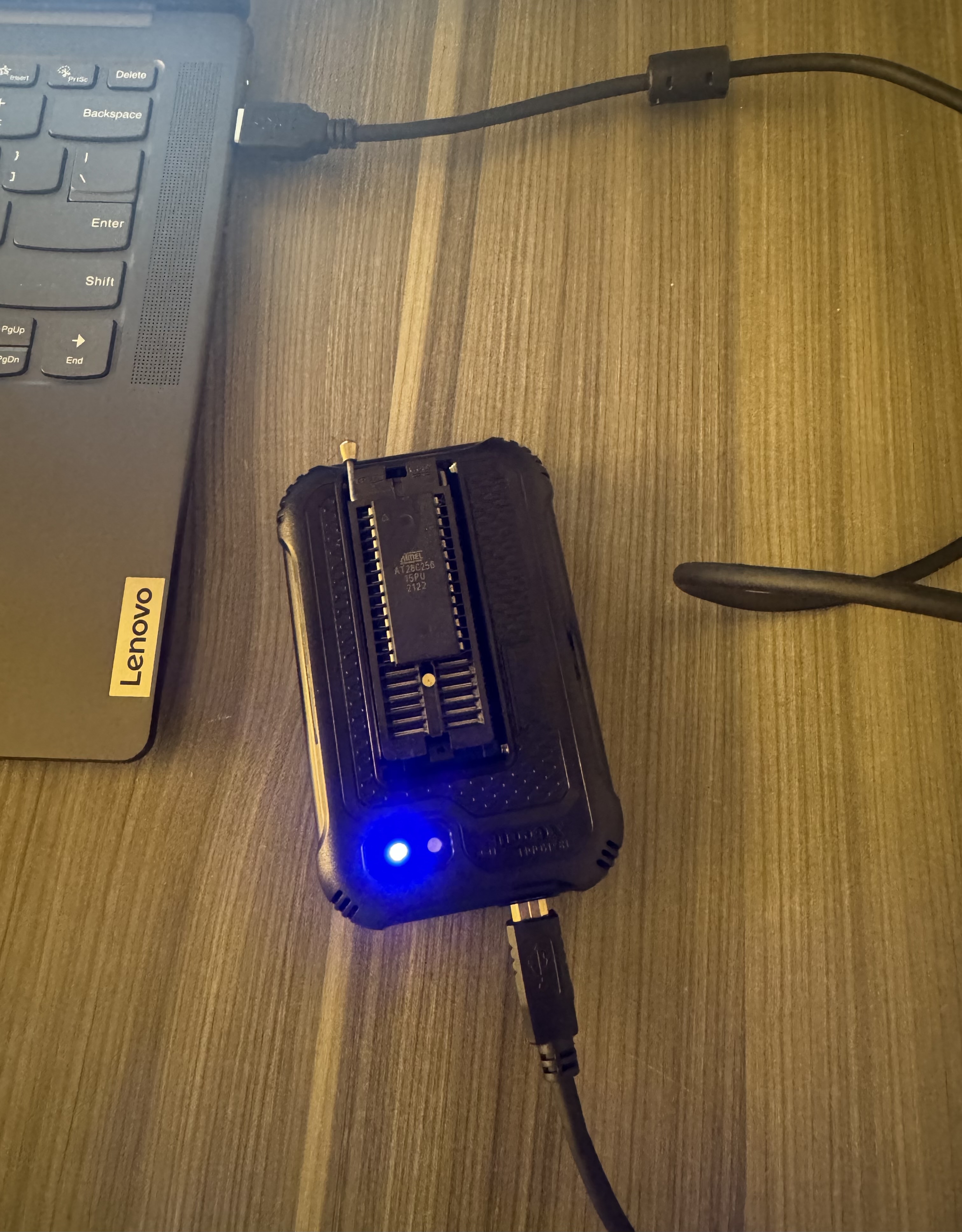
| Part | Role |
|---|---|
| 1 MHz crystal oscillator | System clock |
| W65C02 CPU | The 8-bit microprocessor |
| AT28C256 EEPROM | 32K ROM that holds the program |
| AS6C62256 SRAM | 32K RAM for the stack and variables |
| W65C22S6TPG-14 VIA | Versatile Interface Adapter for I/O ports |
| 16×2 character LCD | Output display, driven by the VIA |
Every chip shares the same address and data buses, so interfacing the system was very tricky. Getting the CPU to function involved a lot of tradeoffs and changes to the implementation of the circuit.
Memory Map & Address Decoding
Address decoding with basic logic gates maps RAM, ROM, and I/O into the 6502's single
64K memory space. The ROM sits at $8000, where the program is assembled to
start, and the VIA's registers appear at $6000–$6003. To
the CPU, the LCD is just a few memory addresses: writing to the VIA's ports drives the
display's data and control pins, which is memory-mapped I/O in action.
Programming
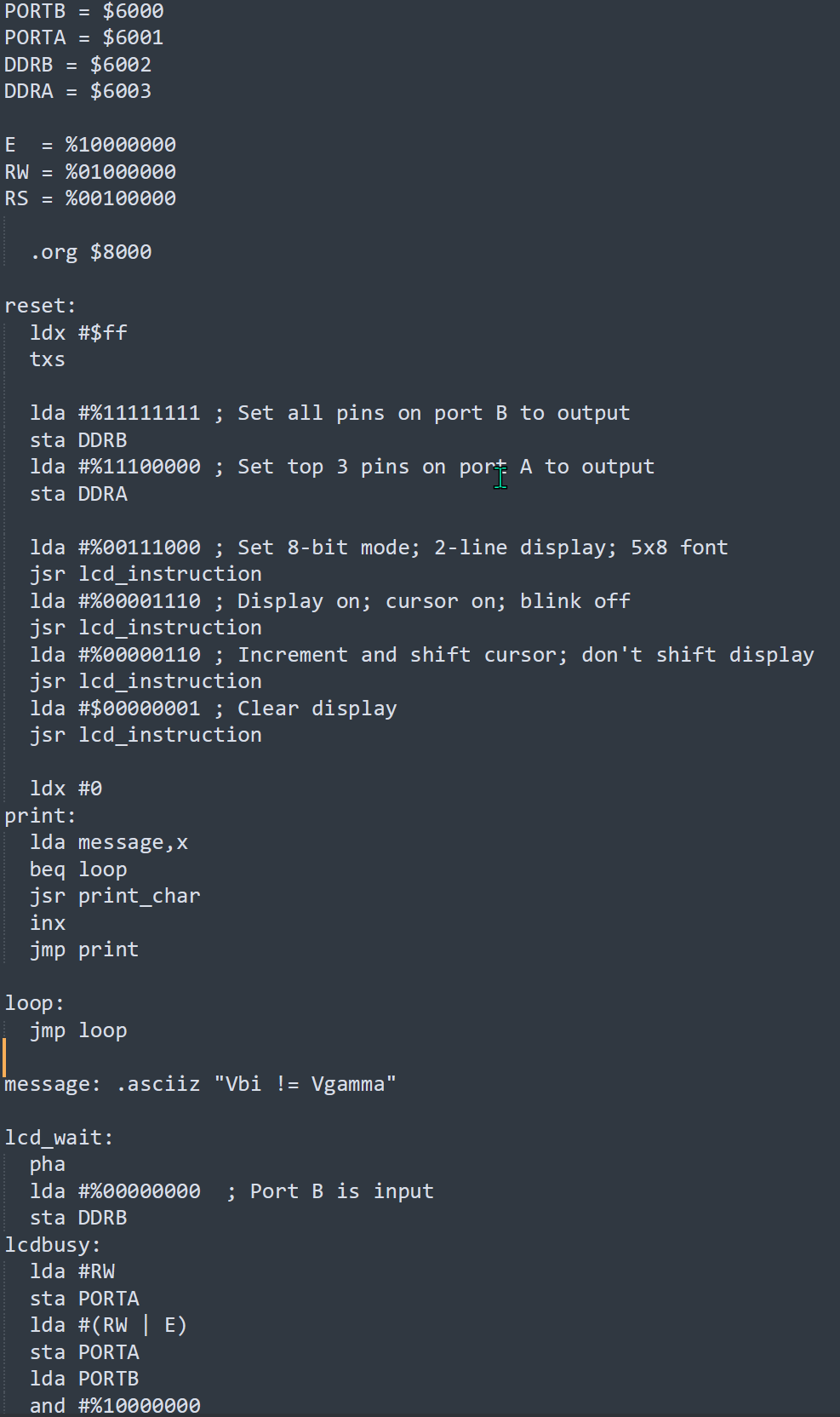
Once the hardware worked, I wrote programs in 6502 assembly, assembled them into a ROM image, and flashed them onto the EEPROM using an XGecu T48 Pro. The program below initializes the stack and the VIA, configures the LCD, and prints a message one character at a time:
PORTB = $6000
PORTA = $6001
DDRB  = $6002
DDRA  = $6003

  .org $8000

reset:
  ldx #$ff
  txs                ; initialize the stack pointer

  lda #%11111111     ; Set all pins on port B to output
  sta DDRB
  lda #%11100000     ; Set top 3 pins on port A to output
  sta DDRA

  lda #%00111000     ; Set 8-bit mode; 2-line display; 5x8 font
  jsr lcd_instruction
  lda #%00001110     ; Display on; cursor on; blink off
  jsr lcd_instruction
  lda #%00000110     ; Increment and shift cursor; don't shift display
  jsr lcd_instruction
  lda #%00000001     ; Clear display
  jsr lcd_instruction

  ldx #0
print:
  lda message,x
  beq loop
  jsr print_char
  inx
  jmp print

loop:
  jmp loop

message: .asciiz "Vbi != Vgamma"
The LCD commands were structured directly from its datasheet. Before each command, a
lcd_wait routine switches port B to input and polls the LCD's busy flag, so
the CPU never sends data faster than the display can accept it.
What I Learned
Even though the microprocessor used for this project is archaic and very underpowered, it still perfectly illustrated the core concepts of fetch, decode, execute. Loading the ROM with my own instructions was very cool and solidified the functionality of a CPU in my mind.
This project also demanded a review of the datasheet for each component to make sure the timing wasn't violated for any of the ICs used, the most crucial being the memory access circuits. This project was the ultimate test of hardware verification.


Designed and synthesized a fully functional CPU in VHDL. Features ALU, Control Unit, Program Counter, register file, and 8×32 memory. Deployed on physical FPGA hardware with simulation testbenches.
Built with Bradley Zaricki for WVU's CPE 271L lab, this project is an 8-bit accumulator-based CPU written in VHDL. The architecture includes an Accumulator (A), Instruction Register (IR), Program Counter (PC), Memory Address Register (MAR), input and output Memory Data Registers (MDRI & MDRO), an Arithmetic Logic Unit (ALU), and a Control Unit (CU). The goal was to demonstrate the fundamentals of a CPU: instruction fetch, decode, and execute.
Instruction Set
Instructions are 8 bits wide: a 3-bit opcode followed by a 5-bit memory address, which allows direct addressing of all 32 read/write memory locations.
| Instruction | Opcode | Operation |
|---|---|---|
| LDAA | 000 | A = Mem[addr] |
| ADDA | 001 | A = A + Mem[addr] |
| STAA | 010 | Mem[addr] = A |
Hardware & Software
The CPU targets the Terasic DE10-Lite (Intel MAX 10, 10M50DAF484C7G), which has a built-in 50 MHz oscillator, switches, LEDs, and 7-segment displays, plus on-chip memory blocks that are well suited to implementing the RAM. The design was written and compiled in Quartus Prime Lite 24.1, which also handled pin assignments, programming over the onboard USB-Blaster, and waveform simulation.
Datapath
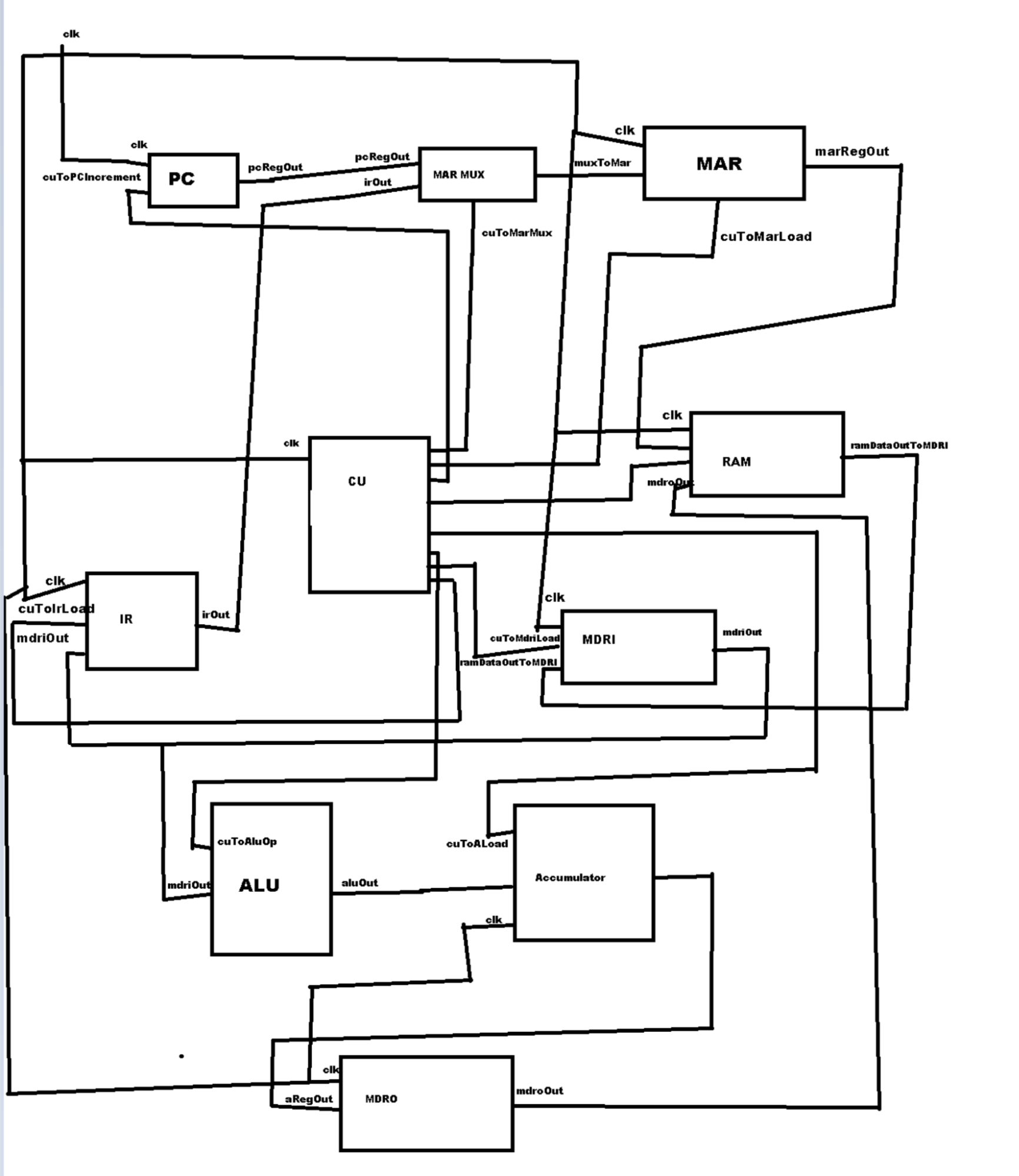
Each block is its own VHDL entity, and a top-level SimpleCPU entity
port-maps them together:
- Program Counter → a clocked counter that increments when the control unit raises
increment. - Registers → one generic 8-bit register entity, reused for A, IR, MAR, MDRI, and MDRO, that loads its input on a clock edge when
loadis high. - MAR Mux → a 2-to-1 mux that feeds the MAR either the PC (to fetch an instruction) or the IR's address field (to access an operand).
- Memory → a 32 × 8-bit RAM preloaded with the program and data. It reads on each clock edge, and writes when
Write_Enableis high. - ALU → takes the accumulator and MDRI as inputs and supports add (
000), subtract (001), AND (010), OR (011), pass B (100), and pass A (101). Its result goes back into the accumulator. - 7-Segment Decoder → converts a 4-bit value (0–F) into segment patterns so register contents can be shown on the board's displays.
Control Unit
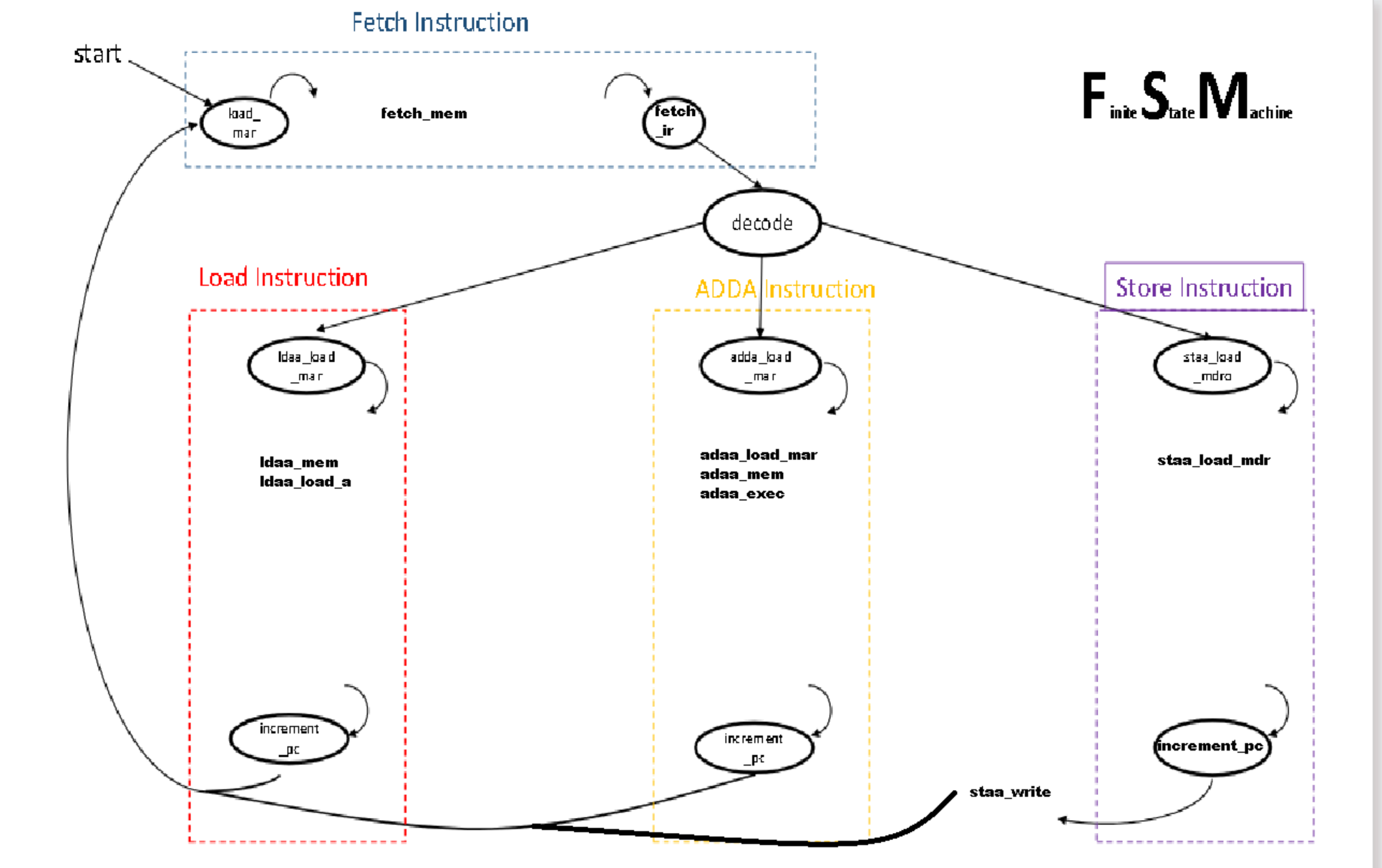
The control unit is a 16-state finite state machine written as two processes. The first handles state transitions. Every instruction starts with the fetch cycle (load MAR, read memory, load MDRI, load IR, decode), then branches on the 3-bit opcode into the LDAA, ADDA, or STAA sequence. The second process drives the control signals for each state. Register loads, PC increment, mux select, RAM write enable, and ALU operation. Every instruction finishes by incrementing the PC and returning to fetch.
Verification
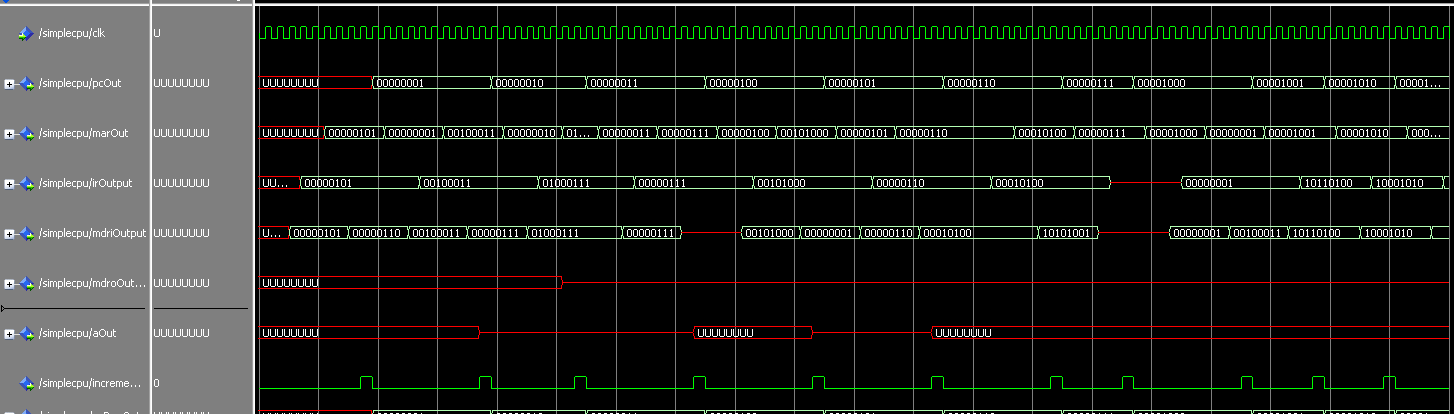
The CPU was verified in waveform simulation by stepping through the preloaded program and checking the PC, MAR, IR, MDRI, MDRO, and accumulator at every state. The waveforms in the gallery show the PC counting through the program while the MAR alternates between instruction and operand addresses.
Challenges
Setting up the waveform simulation environment was not easy and a lot of the project went into reading waveforms to verify the CPU's output. Wiring the block diagram was also tricky because one malformed connection anywhere in the datapath makes the entire output wrong.
Conclusion
The finished CPU executes LDAA, ADDA, and STAA through its FSM control unit, was verified in simulation, and targets the DE10-Lite FPGA. Because the design is modular new instructions or capabilities can be added on top of it.
Simulated CMOS inverter and multi-transistor logic circuits in LTSpice. Optimized PMOS W/L ratios for symmetric switching; verified noise margins with 0.15V tolerance via VIL/VIH/VOL/VOH extraction.
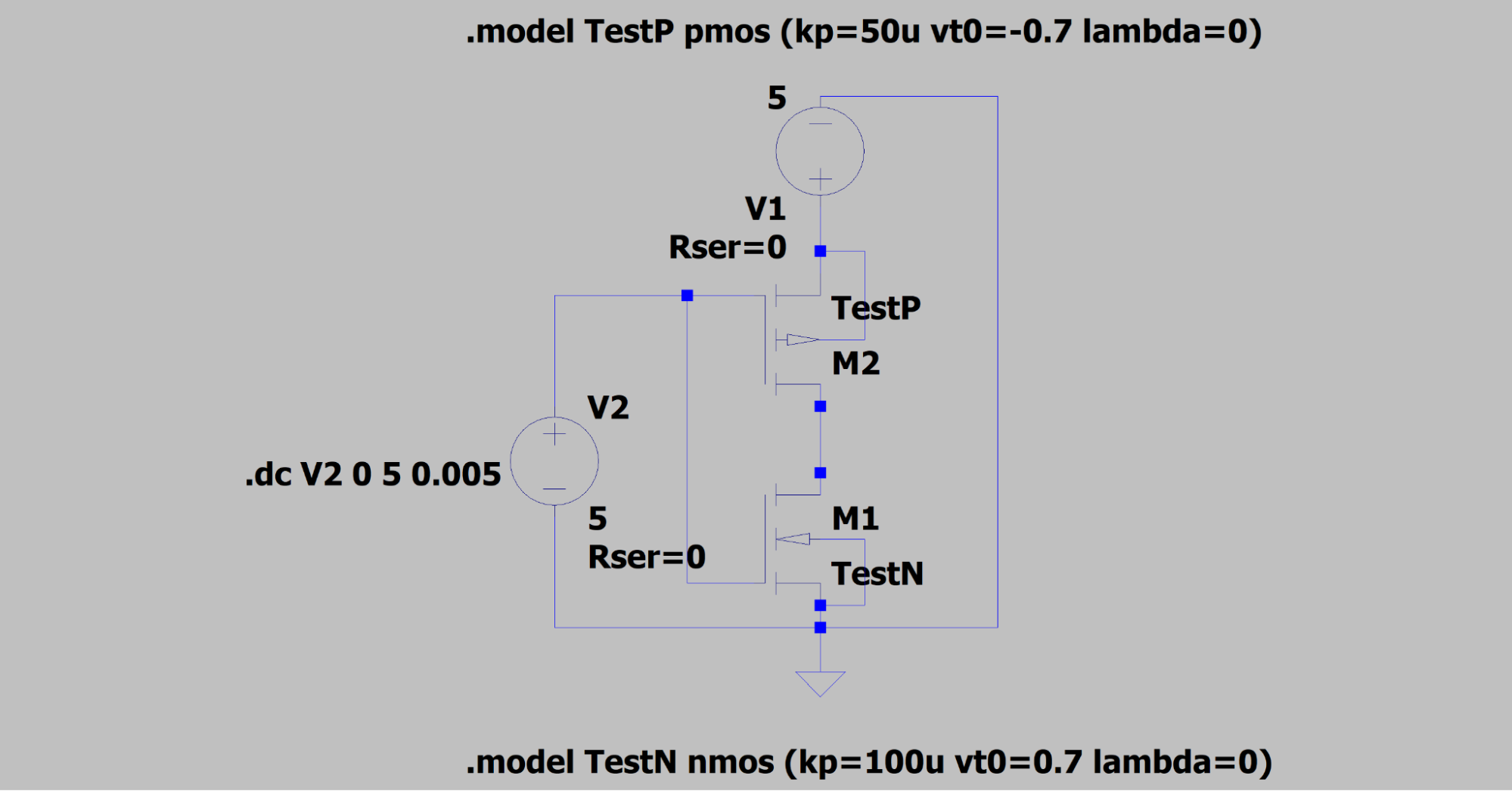
For my EE 251 LTSpice project, I designed and optimized CMOS circuits at the transistor level. The goal was to make each circuit switch symmetrically by sizing the width and length of its MOSFETs, then prove it by extracting the noise margins from the voltage transfer characteristic (VTC). Both transistor models use VT = ±0.7 V and λ = 0, but the NMOS conduction parameter (k′n = 100 µA/V²) is twice the PMOS’s (k′p = 50 µA/V²).
Part 1: CMOS Inverter
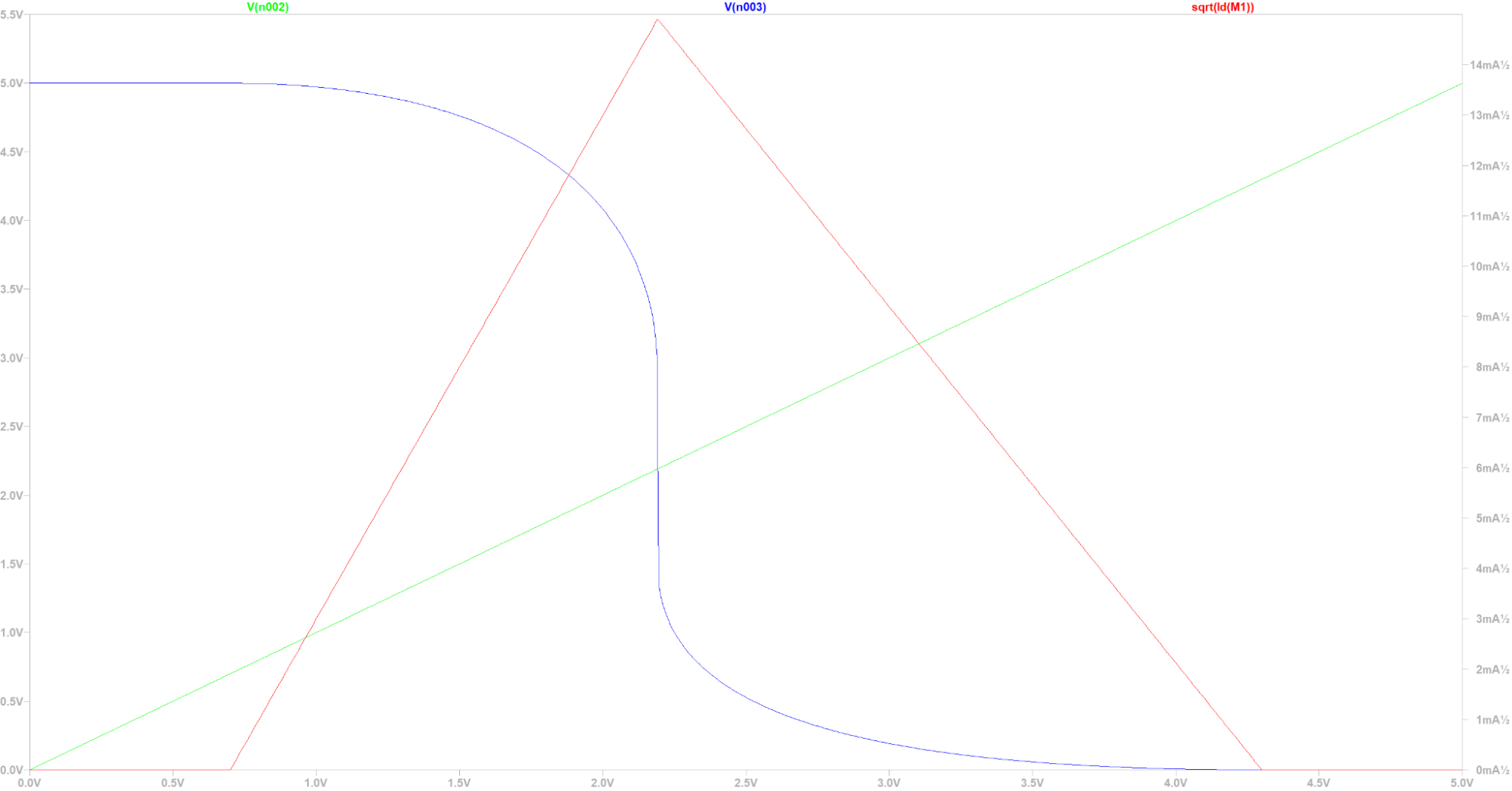
The inverter started with matching transistors: both 10 µm long and 20 µm wide. Sweeping the input from 0 to 5 V and plotting Vo along with the square root of the drain current shows the problem. Because k′n > k′p, the NMOS pulls down harder than the PMOS pulls up, so the switching point lands near 2.2 V instead of VDD/2 and the current curve is skewed to the left.
To find the critical points, I exported the sweep to Excel and computed the slope (y2 − y1) / (x2 − x1) between every pair of samples, looking for where it crosses −1. Then NMH = VOHU − VIH and NML = VIL − VOLU.
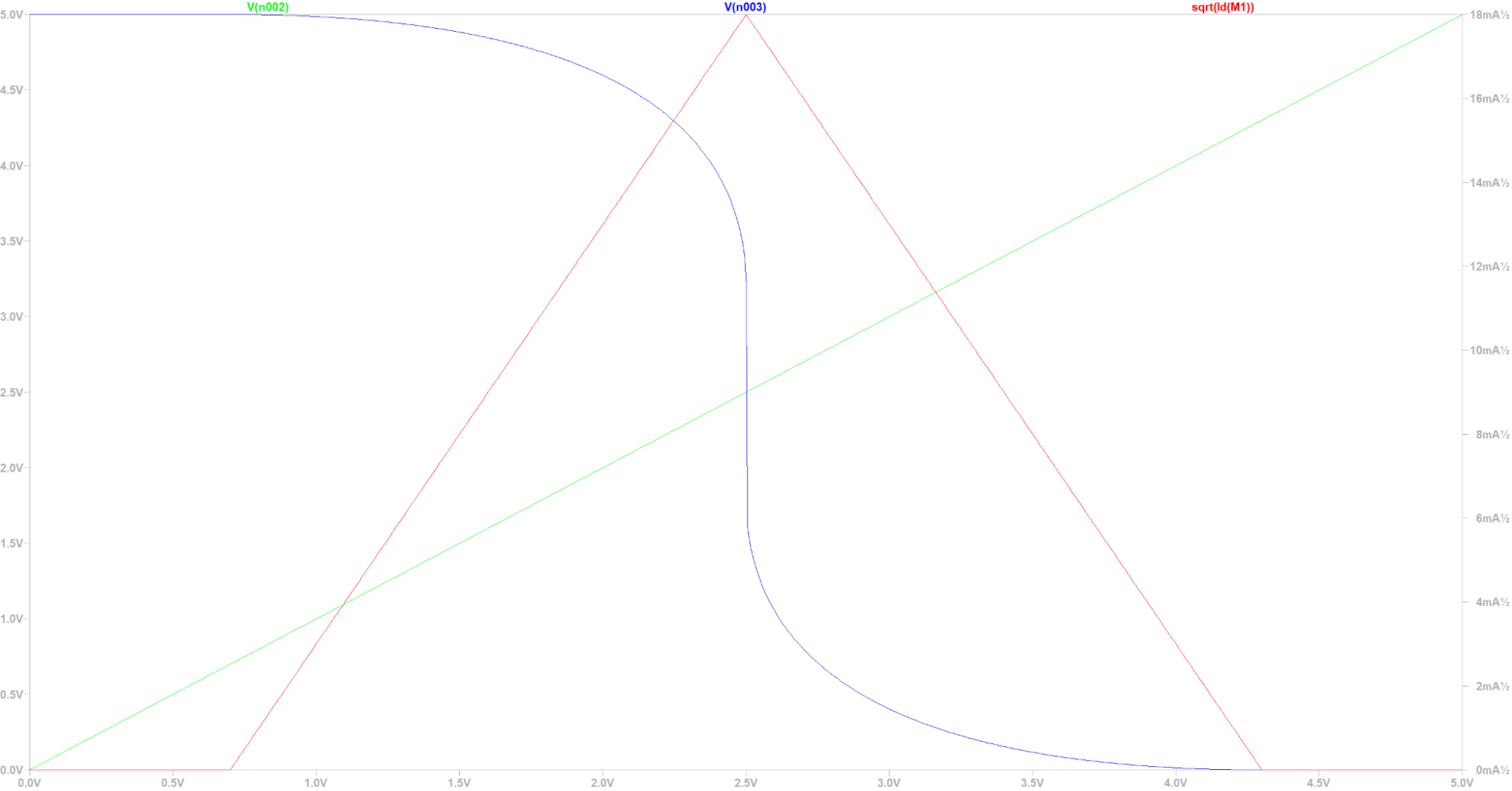
The fix is to double the PMOS’s W/L so that (k′n/2)(W/L) = (k′p/2)(2W/L), which means widening it to 40 µm. With that change, the current curve became a perfect isosceles triangle, the switching point moved to 2.5 V, and the noise margins became nearly equal:
| PMOS W | VIL | VOHU | VIH | VOLU | NML | NMH | |
|---|---|---|---|---|---|---|---|
| Before | 20 µm | 1.66 V | 4.63 V | 2.54 V | 0.485 V | 1.175 V | 2.09 V |
| After | 40 µm | 2.05 V | 4.55 V | 2.95 V | 0.455 V | 1.595 V | 1.60 V |
Part 2: CMOS Logic Gate
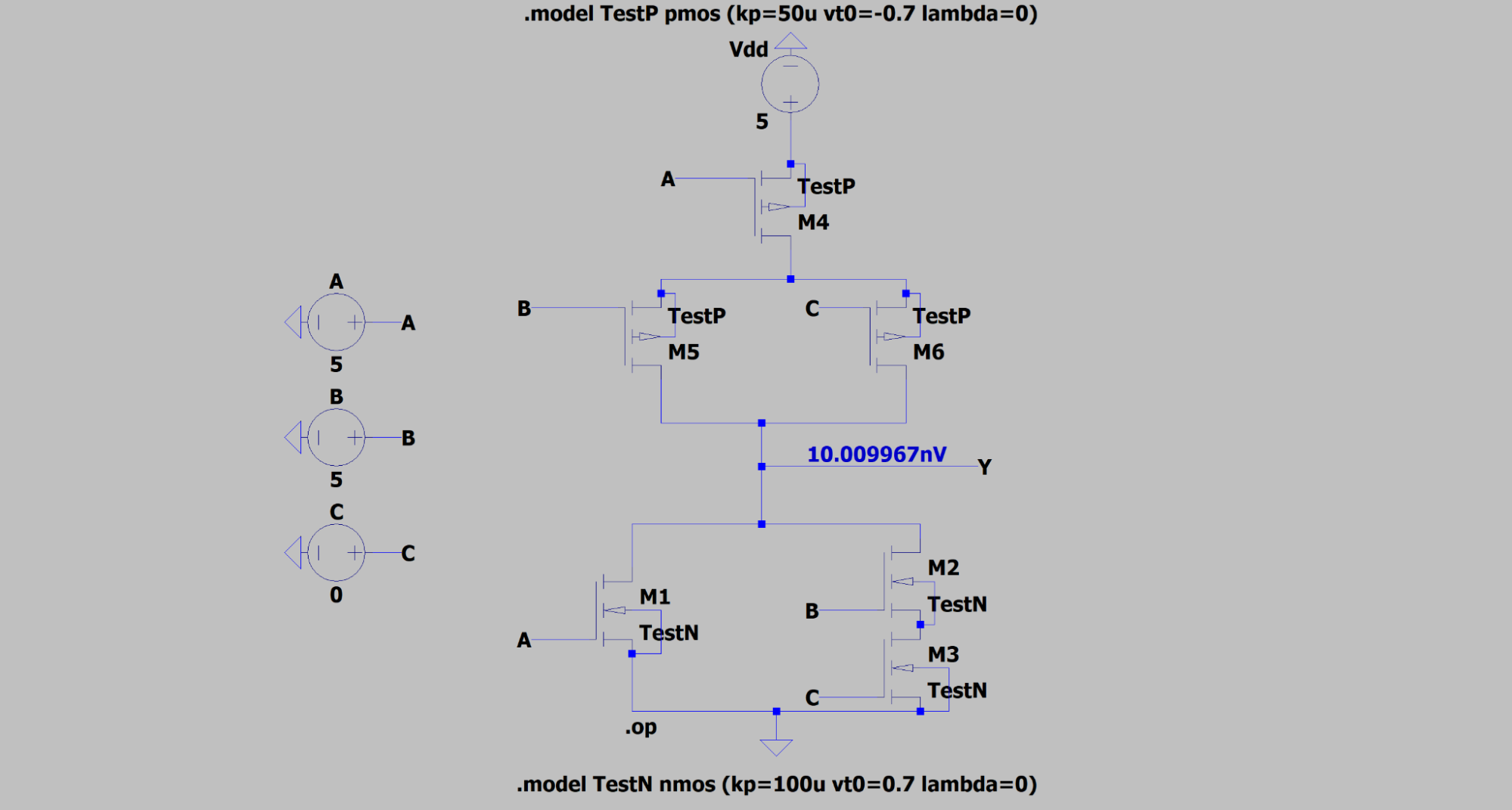
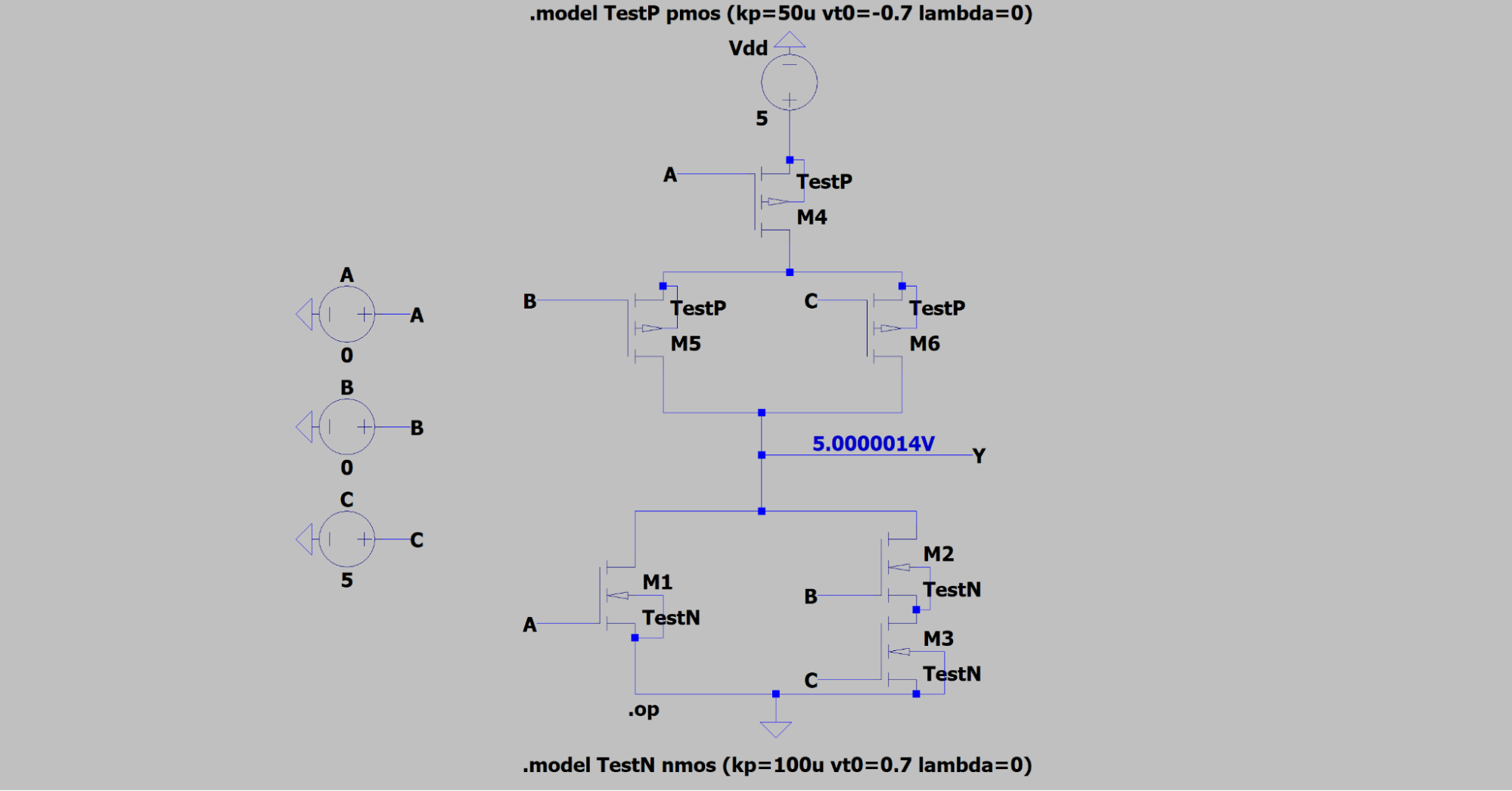
Next, I built the gate Y = A + BC. The NMOS pull-down network reads exactly like the equation: A in parallel with the series pair B and C, so the output is pulled low whenever A is on or both B and C are on. The PMOS pull-up network is the dual: A in series with B and C in parallel. I checked it at operating points. With A = B = 5 V and C = 0 V, Y = 1 + 1·0 = 1, so Y should be low, and the simulation read 10.01 nV. With A = B = 0 V and C = 5 V, Y should be high, and it read 5 V.
Optimizing the Gate
I then optimized the gate for the worst case: A low, B high, and C swept from 0 to 5 V in 5 mV steps. Every transistor was resized so the VTC is symmetrical and the switching point sits at VDD/2:
| Transistor | Type | Input | Width | Length |
|---|---|---|---|---|
| M1 | NMOS | A | 20 µm | 9.75 µm |
| M2 | NMOS | B | 72 µm | 9.75 µm |
| M3 | NMOS | C | 20 µm | 9.75 µm |
| M4 | PMOS | A | 40 µm | 9.75 µm |
| M5 | PMOS | B | 65 µm | 9.75 µm |
| M6 | PMOS | C | 65 µm | 9.75 µm |
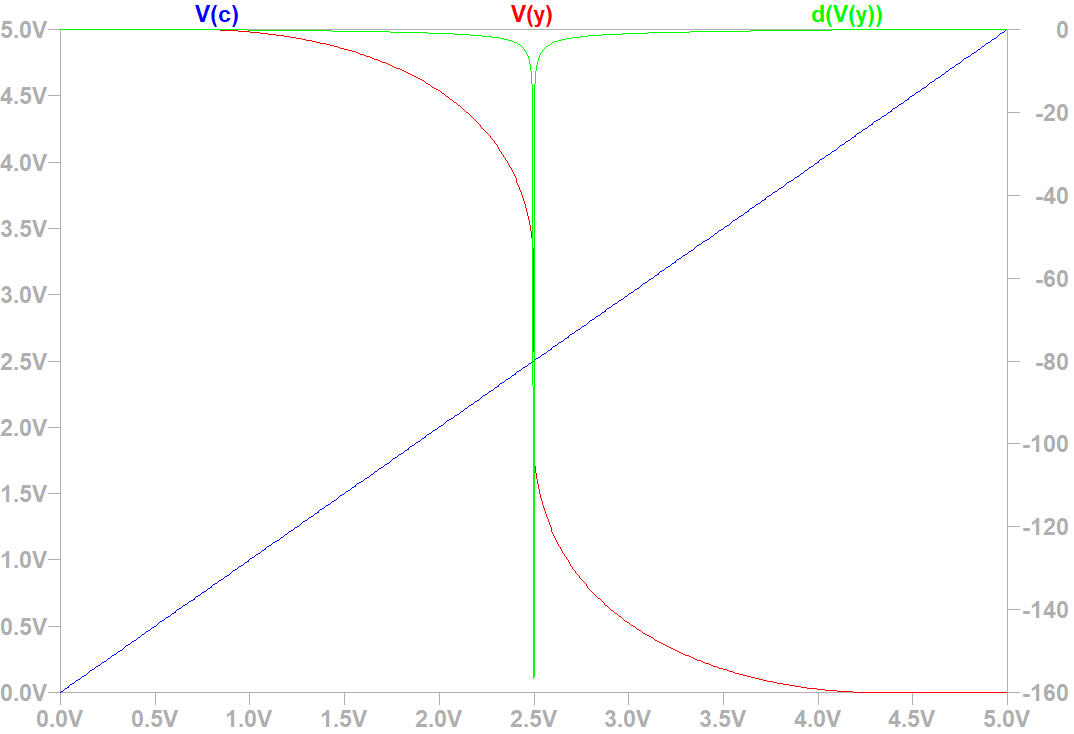
This time I found the −1 slope points directly in LTSpice by plotting the derivative
d(V(y)) and placing cursors on it.
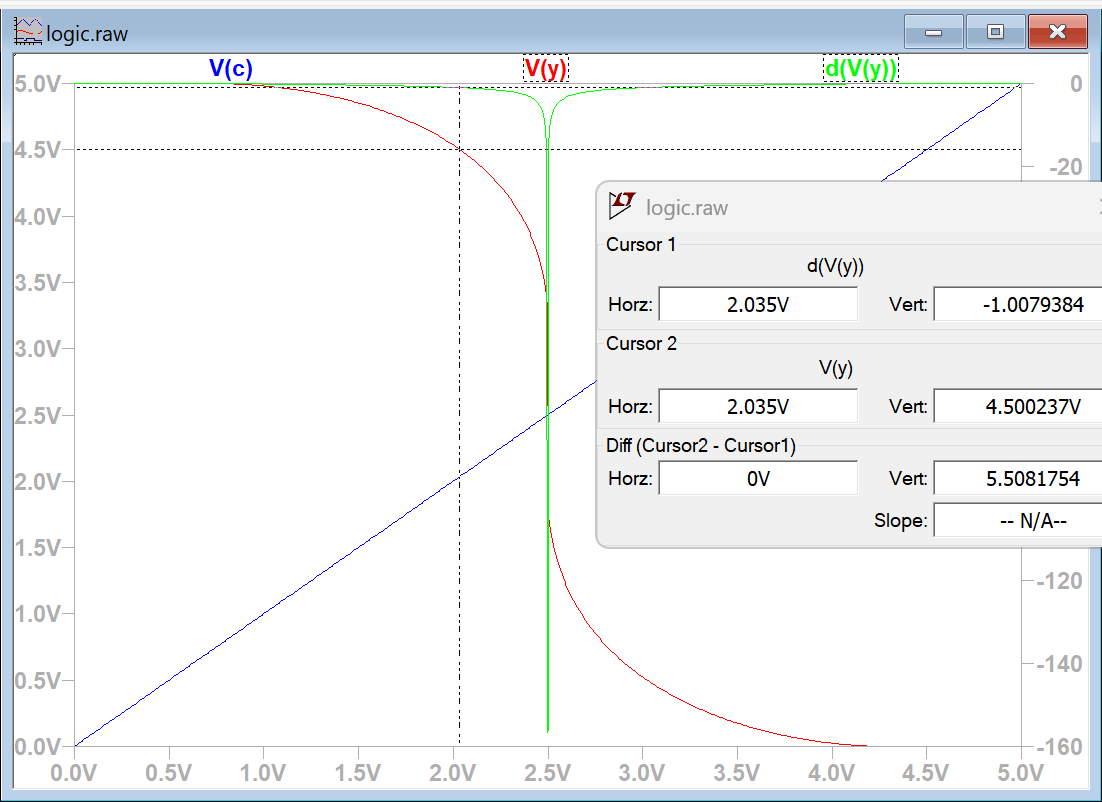
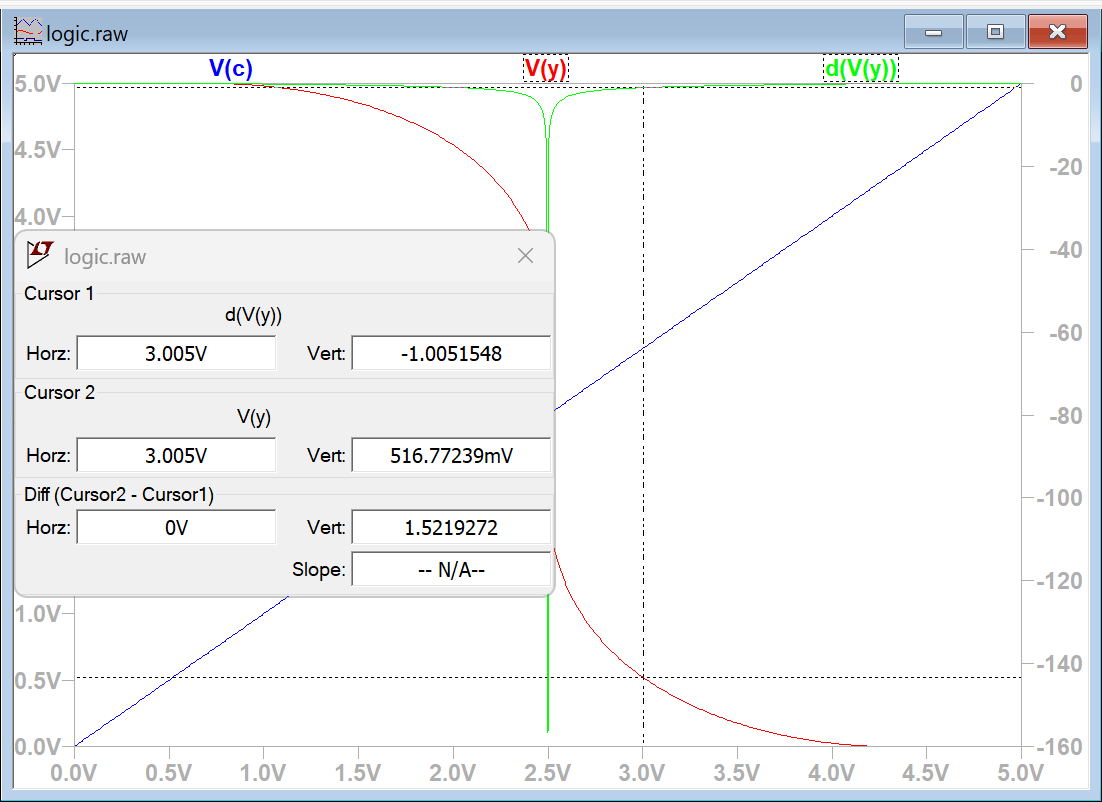
The first point gives VIL = 2.035 V and VOHU = 4.5 V, and the second gives VIH = 3.005 V and VOLU = 0.517 V. That makes NMH = 4.5 − 3.005 = 1.495 V and NML = 2.035 − 0.517 = 1.518 V, a difference of only 0.023 V, well within the 0.15 V spec. Both margins are positive, so the gate can drive an identical copy of itself. Simulating every input combination confirms the truth table:
| A | B | C | Y |
|---|---|---|---|
| 0 | 0 | 0 | 5 V |
| 0 | 0 | 5 | 5 V |
| 0 | 5 | 0 | 5 V |
| 0 | 5 | 5 | 29.0 nV |
| 5 | 0 | 0 | 9.76 nV |
| 5 | 0 | 5 | 9.76 nV |
| 5 | 5 | 0 | 9.76 nV |
| 5 | 5 | 5 | 4.25 nV |
Bonus: Clocked CMOS
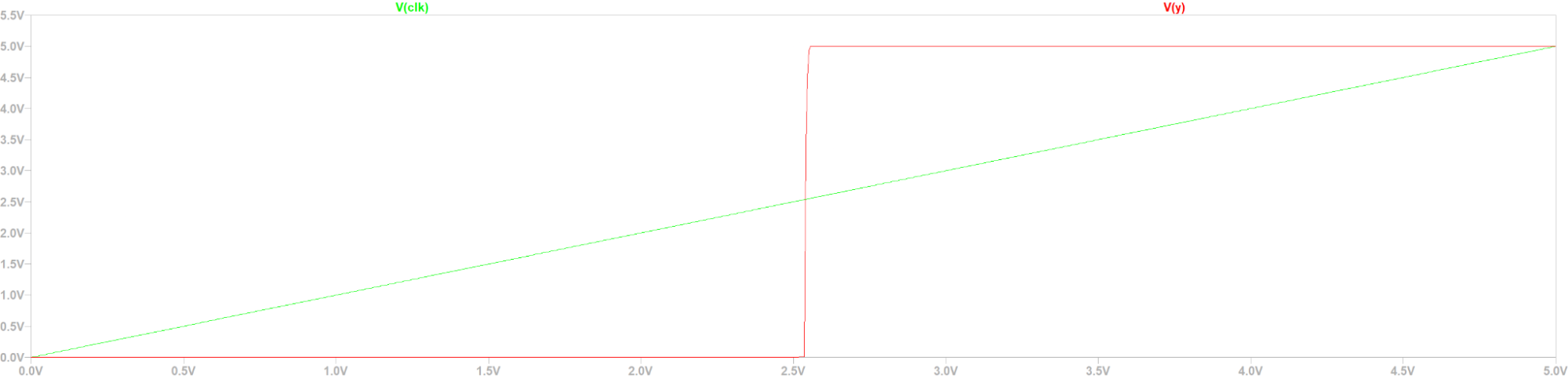
Finally, I added an active-high clock: a clocked PMOS precharges the internal node, a clocked NMOS foots the pull-down network, and an output inverter restores the true polarity. When CLK is high, the gate evaluates normally, giving 5 V for the high cases and tens of µV for the low cases. When CLK is low, the output is held at about 1 pV no matter the inputs. Getting correct outputs required a very large NMOS in the output inverter. That made the clock-swept VTC look like a square wave with no +1 slope points, so its noise margins couldn’t be extracted. With more time, I would resize the transistors or rework the architecture to smooth out that curve.
Conclusion
Transistor sizing is incredibly important to how a CMOS circuit behaves. Matching the drive strength of the pull-up and pull-down networks is what makes switching symmetrical and noise margins balanced, which matters most in nanoelectronics and digital circuits, where CMOS is the standard.
Concurrent GoLang scraper collecting live CS2 item pricing through a distributed SOCKS5 proxy pool. Stored in structured MySQL schema as a standalone pricing backend.
View on GitHubSteamPriceGrabber is a Go program that scrapes the Steam Community Market for the current price of every trade-up eligible CS2 weapon skin and stores the results in MySQL. It covers all six rarities from Consumer to Covert across 88 collections, in both normal and StatTrak™ versions, which gives a local pricing backend that can be queried without hitting Steam.
Querying the Market
The scraper calls Steam’s market search endpoint with norender=1, which returns
JSON instead of HTML. Each request filters by collection (ItemSet), quality
(tag_normal or tag_strange for StatTrak™), and rarity, and the
response is unmarshalled into Go structs that mirror Steam’s schema. Results come back 10 at
a time, so the first response’s total_count determines how many pages to walk
through.
Proxies & Rate Limiting
Steam aggressively rate-limits the market API, so all traffic goes through a rotating SOCKS5
proxy using golang.org/x/net/proxy. Whenever a request comes back with anything
other than HTTP 200, the scraper retries it over a fresh proxy connection until it succeeds.
Parsing
Each market listing name, like StatTrak™ AK-47 | Redline (Field-Tested), is
split into its parts: the StatTrak™ prefix becomes a flag, and the gun, skin name, and
wear are separated on the | and parentheses. The price text (for example
$1,234.56) is stripped and parsed into a decimal. Knife listings
(★) are skipped because they aren’t trade-up eligible.
Database
The skins database has one table per rarity, all with the same schema. A unique key
on gun, skin, StatTrak™, wear, and collection means every insert is an upsert, so running
the scraper again refreshes prices instead of creating duplicates:
CREATE TABLE covert (
    id              INT AUTO_INCREMENT NOT NULL,
    price           DECIMAL(8,2) NOT NULL,
    gun             VARCHAR(100) NOT NULL,
    skin            VARCHAR(100) NOT NULL,
    statTrak        BIT NOT NULL,
    wear            VARCHAR(50) NOT NULL,
    collection_name VARCHAR(100) NOT NULL,
    PRIMARY KEY (id),
    UNIQUE KEY unique_skin (gun, skin, statTrak, wear, collection_name)
);

INSERT INTO covert (price, gun, skin, statTrak, wear, collection_name)
VALUES (?, ?, ?, ?, ?, ?)
ON DUPLICATE KEY UPDATE price = VALUES(price);
Results
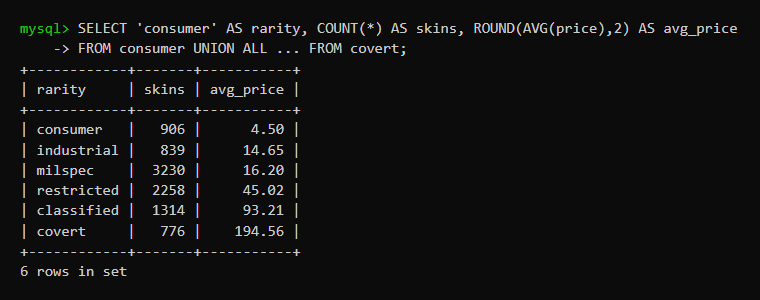
A full run collected 9,323 skin prices. Average price climbs steeply with rarity, from $4.50 for Consumer grade to $194.56 for Covert:
Built elder abuse monitoring software in <24 hrs at SteelHacks XII using Python ML to process and categorize audio speech. Won the Healthcare Optimization and Civics & Accessibility categories out of 500+ participants.
View on Devpost View on GitHub Watch DemoElderGuardian is protective monitoring software for elderly people in hospice care or retirement homes, people who often can’t stand up for themselves. A discreet in-room device records conversations, tells the voices apart, and assigns each one to a profile. If concerning behavior shows up, loved ones can open a secure dashboard to read the transcribed conversation with timestamps, speaker labels, and the flagged sentences highlighted.
I built it with Ryan Fusco and Bradley Zaricki in under 24 hours at SteelHacks XII, the University of Pittsburgh’s hackathon. Out of 500+ participants, it won two categories: Healthcare Optimization and Civics & Accessibility. My part was the audio diarization in Python turning raw recordings into transcripts where every line is labeled with who said it.
Pipeline
- Transcription & diarization (my part) → recorded audio runs through whisper-diarization, which uses OpenAI’s Whisper to transcribe speech and labels who said each line. The output is an SRT transcript with timestamps.
- Parsing → each SRT block is turned into a
Sentence, and its speaker label (Speaker 0,Speaker 1, …) is mapped to aPersonprofile in the database. - Sentiment analysis → NLTK’s VADER scores every sentence from −1 to +1, and negative sentences are flagged. The whole conversation gets a score weighted by each sentence’s word count so long hostile remarks count more than short ones.
- Storage → people and conversations are stored in MongoDB as Python
dataclasses (
Person,Conversation,Sentence) that serialize to and from documents. - API → a Flask server exposes the data to the dashboard.
- Dashboard → a React front end shows flags, conversations, and sentiment over the last 72 hours, along with each care partner’s role and alert count. Clicking a conversation opens the full transcript with its flagged sentences.
REST API
| Endpoint | Returns |
|---|---|
/people | Every person with their role and conversations |
/person/<name> | A single person |
/conversations | Every conversation with sentences, scores, and flags |
/conversation/<id> | A single conversation |
/conversations/<name> | All conversations a person took part in |
/flags/<name> | Total flags across a person’s conversations |
/new-audio | Parses a new transcript and stores the conversation |
Scoring Conversations
def analyze_conversation(conversation: List[Sentence]) -> float:
    """Length-weighted compound score between -1 and +1."""
    weighted_sum = 0.0
    total_weight = 0
    for s in conversation:
        scores = analyze_sentiment(s.text)        # VADER polarity scores
        weight = max(len(s.text.split()), 1)      # weight = word count
        weighted_sum += scores["compound"] * weight
        total_weight += weight
    return weighted_sum / total_weight
The dashboard turns each score into a label:
| Score | Label |
|---|---|
| ≤ −0.6 | Terrible |
| −0.6 to −0.2 | Bad |
| −0.2 to 0.2 | Fair |
| 0.2 to 0.6 | Good |
| ≥ 0.6 | Excellent |
Challenges
Speaker diarization, my part of the project, was the hardest piece. Reliably telling voices apart in a short recording and mapping them to the right person took a lot of trial and error. The language classifier and the dashboard were also tricky to finish under the time limit. We were proudest of having the database fully connected to the front end so information flowed from recorded audio all the way to the dashboard.
What I Learned & What’s Next
The project taught us about audio analysis, networking, database tools, and planning a design flow as a team under pressure. The next step is a dedicated continuous voice monitoring device with better audio quality, to turn the prototype into a shippable product.

